


MealMaster - Recipe Keeper
3.910.00 Reviews
App Specs
- Version
- 13.7
- Updated On
- License
- Free
- Downloads
- 10,000+
- Developer
- Tikamori
- Categories
- Food & Drink
- Platform
- Android
Screenshots
 Analysis by AppCompare
I like recipe apps that solve a practical problem instead of trying to become a complete social network. MealMaster - Recipe Keeper takes that simpler route. It is a free Food & Drink app from Tikamori built around creating recipes, keeping them in one place, adjusting serving quantities, and converting measurements while cooking. After spending time with it, I see the main appeal clearly: it is less about discovering endless dishes and more about making the recipes you already use easier to manage.
That distinction matters for a first-time user. If you want a large community, polished food photography, grocery delivery, or a stream of professionally tested recipes, this may feel limited. If your phone is full of screenshots, handwritten notes, and recipes that never quite scale correctly, the app has a more focused purpose. I found it most useful as a personal kitchen notebook that can do some of the arithmetic for me.
What to expect when you open MealMaster
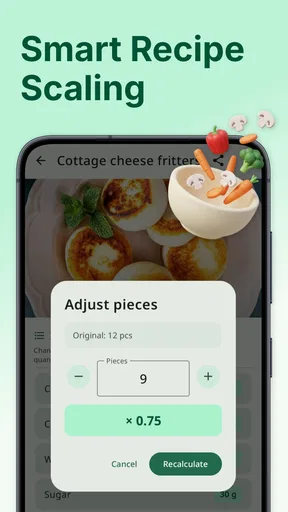
The app’s central idea is straightforward: build a personal collection of recipes and make those recipes more flexible. You can enter a dish, save its ingredients and instructions, change the number of servings, and use conversions when the original measurements do not match the tools or ingredients in your kitchen. That combination makes it especially relevant to home cooks who regularly adapt recipes rather than follow them exactly.
MealMaster is currently at version 13.7 and works on Android 9 or newer. It is rated for Everyone, so it is presented as a general-purpose cooking tool rather than an app aimed at a restricted audience. The app has passed the early experimental stage too, with over ten thousand installs and a 3.9 average from around one hundred fifty ratings. I would treat that as a sign of a useful niche tool with a mixed but respectable response, not as proof that it will suit every cooking style.
The free installation makes it easy to try without committing money first. There are in-app purchases ranging from $2.99 to $28.99 per item, so I would look carefully at what is available inside the app before assuming every function is included at no cost. For a casual cook, the free starting point is helpful; for someone planning to build a large recipe archive, the purchase structure deserves attention before investing hours in organizing everything.
My first useful expectation is that the app rewards preparation. It is not the kind of tool that becomes valuable simply by opening it once and browsing. Its value grows when you put your own recipes into it and then return to those recipes while shopping, preparing ingredients, or cooking for a different number of people.
Getting from installation to a usable recipe
I recommend beginning with one recipe you know well rather than trying to transfer your entire collection. Choose something with a manageable ingredient list and familiar instructions. This gives you a quick way to learn how MealMaster handles recipe entry, and it lets you test serving changes without risking an important holiday dish or a complicated baking formula.
Worth Reading Before You Choose

Flipboard Shows What News Apps Must Do Beyond the Feed

Switching to Android Auto Means Rethinking Your Driving Routine

Google Calendar Makes a Crowded Week Easier to Manage

Ludo King Makes the Most of the Minutes Between Plans

Baby Panda World Brings Quick Play to Modern Phones, but Its Game Library Feels Busy

ESPN’s Live Game View Makes Following Close Games Easier
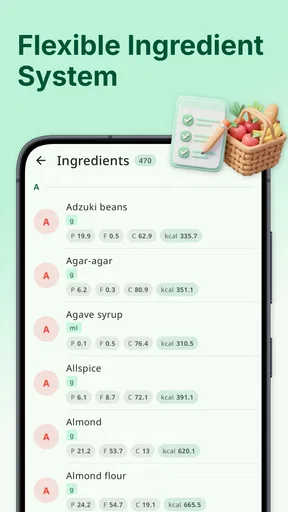
When entering a recipe, consistency is more important than speed. Use the same style for ingredient names each time, and keep quantities attached to the correct ingredient. If you type “flour” in one recipe and a more detailed variation in another, your collection may become harder to scan later. The app can help with calculations, but it cannot decide whether two differently named ingredients are interchangeable in your kitchen.
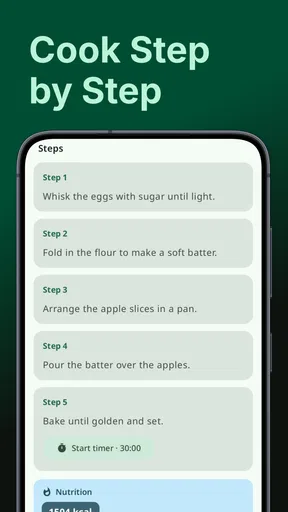
I would also enter instructions in the order you actually cook them. A recipe saved only as a list of ingredients is useful for shopping, but it does not preserve the small decisions that make a familiar meal work. Include preparation steps, cooking order, and any timing reminders you normally write in the margin of a cookbook. That turns the app from a storage box into a repeatable cooking reference.
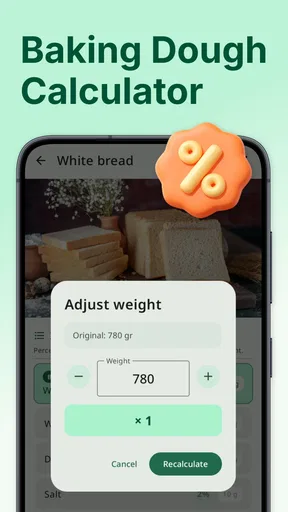
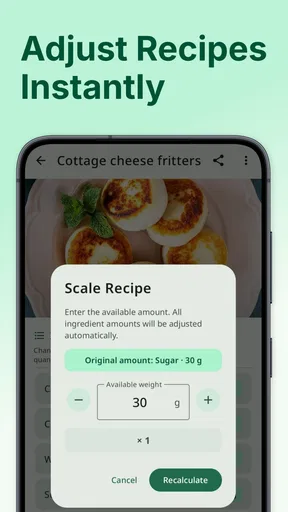
A good setup habit is to start with a recipe that you often make for different numbers of people. This immediately tests one of the app’s most practical jobs: converting a recipe for a smaller weeknight meal or a larger gathering. It also exposes an important limitation of any recipe calculator. Multiplication is easy; cooking judgment is not. A doubled sauce may need adjustment, while a seasoning quantity may not behave perfectly when scaled.
Your first meaningful success
For me, the first real success would be saving a familiar meal and changing its serving size before cooking. Imagine planning dinner for two when your usual recipe feeds four. Instead of doing the arithmetic on paper, I would open the saved recipe, adjust the servings, and use the revised quantities as my working guide. That is a small action, but it shows whether the app fits naturally into an everyday routine.
There is a useful workflow hidden in that simple test. First, enter the recipe while you have the original instructions nearby. Next, check the converted quantities against what you normally buy. Then, before starting, review the result for ingredients that should be handled with judgment rather than blindly divided. Eggs, spices, thickening agents, and strongly flavored ingredients are good examples of items I would verify manually.
Measurement conversion is similarly helpful when it removes a small interruption. If a recipe uses a unit I do not normally measure with, I can use the app as a quick reference instead of stopping to search elsewhere. I still keep a little skepticism around conversions involving very different ingredient densities. A volume conversion can be mathematically correct while producing an awkward result for an ingredient that is usually weighed.
The strongest everyday use case is a busy evening. I can save a recipe once, adjust it for the number of people eating, and keep the instructions available while moving between preparation and cooking. That is more reliable than scrolling through a long message thread or trying to find a screenshot among dozens of unrelated images. The real payoff is fewer small decisions during cooking, not a more glamorous recipe collection.
Where new users may hesitate
The first point of confusion is likely to be the difference between storing a recipe and discovering one. MealMaster is best understood as a recipe-making and recipe-keeping tool. It does not replace a general search engine or a cooking website when you need inspiration for a particular ingredient. I would arrive with a recipe to enter, adapt, or organize rather than expecting the app to plan my entire menu from an empty screen.
Another possible stumbling block is trusting the calculator too much. A changed serving count gives you a useful starting point, but it does not guarantee that every part of the recipe should be scaled in exactly the same way. If you are preparing bread, custard, a delicate sauce, or anything where texture depends on technique, I would use the adjusted amounts as guidance and apply normal cooking knowledge.
Conversions also deserve a quick check before ingredients go into the bowl. Different countries and measuring habits use familiar words differently, and some ingredients are more accurate by weight than volume. MealMaster can reduce the mental work, but it cannot remove the need to understand the recipe itself. I see that as a sensible trade-off rather than a flaw unique to this app.
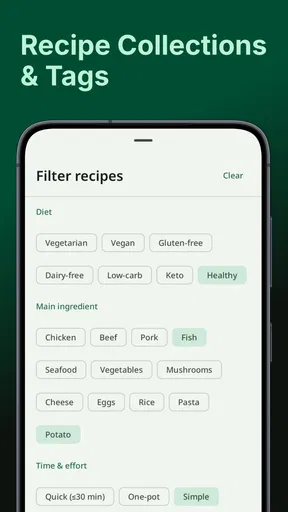
Organization is another area where your own habits matter. If you save recipes without a consistent naming approach, finding the right version later can become frustrating. I would name variations clearly, especially when I have changed the spice level, serving size, or cooking method. A recipe keeper is only as useful as the archive it helps you maintain.
There is also a practical question about purchases. Since the app is free to install but includes optional items priced from $2.99 up to $28.99, I would avoid building my entire workflow around features I have not yet checked. Start with the basic experience, decide whether entering and adjusting recipes feels comfortable, and only then consider whether a paid option is worthwhile for your needs.
Three workflows that make it more useful
My first recommended workflow is a “base recipe” system. Save a dependable version of a dish, then create clearly named variations for changes you make often. For example, you might keep a standard soup and a smaller version for a quick lunch, rather than repeatedly editing the original and forgetting what changed. This approach protects the recipe you trust while still taking advantage of serving adjustments.
The second is to use it before shopping, not only beside the stove. Adjust the recipe to the number of diners first, then review the ingredient quantities as a shopping checklist. This catches an easy-to-miss problem: a recipe that looks fine for four people can create waste when you are cooking for one or two. The app’s calculator is therefore useful as a planning aid, even when you do not need a conversion during cooking.
The third is to treat conversions as a preparation step. If you know that your measuring tools do not match the recipe, convert the quantities before you begin and write down any judgment calls. That keeps you from repeatedly switching between the cooking screen and another reference. It is a small habit, but it makes the app feel much more integrated into the process.
A less obvious trade-off is that digital organization encourages you to preserve every variation. That can be helpful, but it can also create clutter. I would periodically decide which version is the one I actually want to cook again. Keeping a trusted “final” recipe alongside experimental copies makes the collection easier to use when I am hungry and in a hurry.
Who will appreciate it, and who should skip it
I would recommend MealMaster to people who already have recipes scattered across notes, screenshots, messages, or paper cards. It is also a good fit for cooks who regularly halve or multiply recipes, families whose meal sizes change from day to day, and anyone who wants a personal collection instead of another public feed. The app’s focused design makes sense when the main problem is managing your own cooking information.
It may also suit a beginner who wants to learn by recording a few reliable dishes. Saving a recipe in a structured way can encourage repeat cooking, and changing serving quantities gives a beginner a gentle introduction to planning. I would still pair it with a trusted cooking source for learning techniques, because a calculator cannot teach knife skills, heat control, or how a finished dish should look.
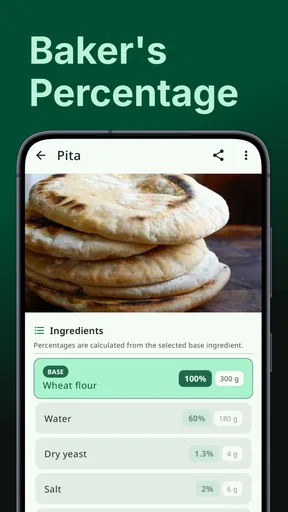
I would skip it if your priority is recipe discovery. Someone who wants personalized recommendations, videos, community comments, restaurant ordering, or a constantly refreshed catalog will probably find a broader food platform more satisfying. I would also hesitate to choose it as my only tool for serious baking unless I was comfortable checking the app’s calculations against weight-based methods and the original baker’s instructions.
Compared with a notes app, MealMaster has a clearer cooking purpose because recipe quantities, serving changes, and conversions belong together. A plain notes app may be faster for a single recipe, but it usually leaves the arithmetic and organization to you. Compared with a large recipe website, MealMaster feels quieter and more personal. You give up much of the discovery experience in exchange for control over the recipes you actually want to keep.
How I would build a dependable collection
I would begin with five recipes that I genuinely repeat, not fifty recipes I might cook someday. For each one, I would enter the ingredients carefully, preserve the preparation order, and test a serving adjustment. After cooking, I would update the recipe with the correction I actually needed. This turns the collection into a record of real experience rather than a pile of copied instructions.
I would also separate “reference” recipes from “working” recipes in my own naming. A reference recipe is the version I trust. A working recipe is the one I am currently changing. That distinction helps avoid a common digital mistake: editing a dependable recipe for one occasion and later forgetting that it no longer represents the original proportions.
When a conversion produces an inconvenient fraction, I would round only after considering the ingredient. A small rounding change may be harmless in a stew, while it can matter in a cake. This is one of the places where human judgment remains essential. The app reduces calculation time, but the cook still decides whether a neat number is sensible.
For shared household cooking, I would use the saved recipe as a common reference rather than relying on verbal instructions. One person can adjust the serving amount, another can prepare ingredients, and both can work from the same version. That can prevent the familiar problem of one person using an old note while another uses a newer variation.
My final view after using it
MealMaster - Recipe Keeper is a focused free app from Tikamori that earns its place by handling a few useful kitchen jobs together. Its recipe storage, serving calculator, and measurement conversion are most valuable when applied to meals you already cook. I like that it addresses the unglamorous parts of home cooking: finding the right version, changing quantities, and keeping instructions close at hand.
It is not the right choice for every cook. The experience depends on entering and maintaining your own recipes, and the calculator should support judgment rather than replace it. The free entry point is welcome, but the presence of in-app purchases means I would examine the available options before treating it as a long-term archive.
For a first-time user, my advice is simple: install it, enter one familiar recipe, adjust that recipe for your next meal, and check the result against your cooking instincts. If that saves you from searching through screenshots or doing last-minute arithmetic, you have already found the app’s main strength. I would recommend it as a practical personal recipe notebook, especially for cooks who value control and repeatable everyday workflows over endless discovery.
Pros
- Clean layout makes recipes easy to browse and follow.
- Saves favorite recipes for quick access later.
- Useful for organizing personal recipes in one place.
- Helps reduce the need for printed recipe cards.
- Suitable for cooks with different experience levels.
Cons
- Some features may require payment or in-app purchases.
- Recipe entry can take time if adding details manually.
- Limited value if you already use another recipe organizer.
- App performance may vary on older phones or tablets.
- Imported recipes may need formatting or editing afterward.
FAQs for MealMaster - Recipe Keeper
What is MealMaster - Recipe Keeper used for?
MealMaster - Recipe Keeper is designed to help you organize, save, and manage recipes in one convenient place. You can use it to keep family recipes, cooking ideas, and frequently prepared meals together instead of searching through notes, screenshots, or websites. It is especially useful for users who want a more structured personal cookbook and easier access while preparing food.
Can I add my own recipes to MealMaster - Recipe Keeper?
Yes, the app is intended for building a personal recipe collection, so adding your own recipes is one of its most useful features. You can typically record ingredients, preparation steps, cooking details, and other notes. This makes MealMaster practical for preserving handwritten family recipes, adapting online recipes, or creating a customized cookbook based on your own cooking habits.
Does MealMaster - Recipe Keeper work without an internet connection?
Many recipe-keeping functions can be useful offline once your recipes have been saved on the device, which is convenient when cooking in a kitchen with unreliable Wi-Fi or mobile data. However, features such as downloading online content, synchronization, account services, or updates may require an internet connection. Availability can depend on the app version and your device settings.
Is MealMaster - Recipe Keeper free to download and use?
The app may be available as a free download, but users should check its current store listing for possible limitations. Some versions of recipe applications include advertising, optional purchases, premium tools, or restrictions on storage and organization features. Before downloading, review the pricing section, subscription terms, and in-app purchase information so there are no surprises after installation.
Is MealMaster - Recipe Keeper suitable for meal planning and shopping?
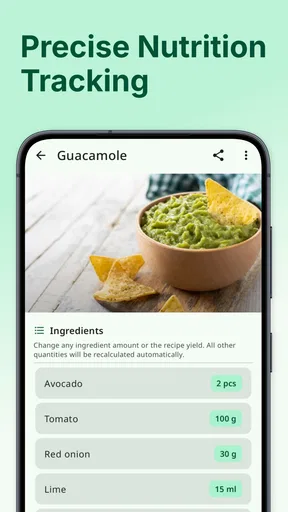
MealMaster - Recipe Keeper can be helpful for planning meals because keeping recipes organized makes it easier to decide what to cook during the week. Depending on the version, it may also offer tools for categories, favorites, notes, or ingredient management. Users looking specifically for automatic shopping lists, nutrition tracking, or advanced weekly planning should confirm that those features are included.


